
Cutroom for iPhone
Cut. Cleaned. Captioned.
You got the take. Now lose the dead air. Cutroom finds the ums and long pauses, cleans up your audio, and captions the whole thing on your iPhone.

- Made for iPhone
- iOS 18 or later
- No account, nothing uploaded
How it works
From long take to finished file
Import
Add one clip or several from Photos or Files. Trim, split, and reorder them into one sequence.
Review the cuts
Cutroom lists the long pauses and, if you ask, the filler sounds. Keep or cut each one.
Clean and caption
Clear up the voice, then generate captions and correct them line by line.
Export
Save a vertical, square, or landscape MP4 to Photos, or share it straight from the app.
Review
Stop scrubbing for dead air
A ten-minute tutorial can hide dozens of small pauses. See them all in one list, listen at each join, and leave in the breaths that make the point land.
So, today 1.2 s we're walking through the setup…
…and then 0.8 s we can check the result…
…but 2.0 s let's get to the demo…
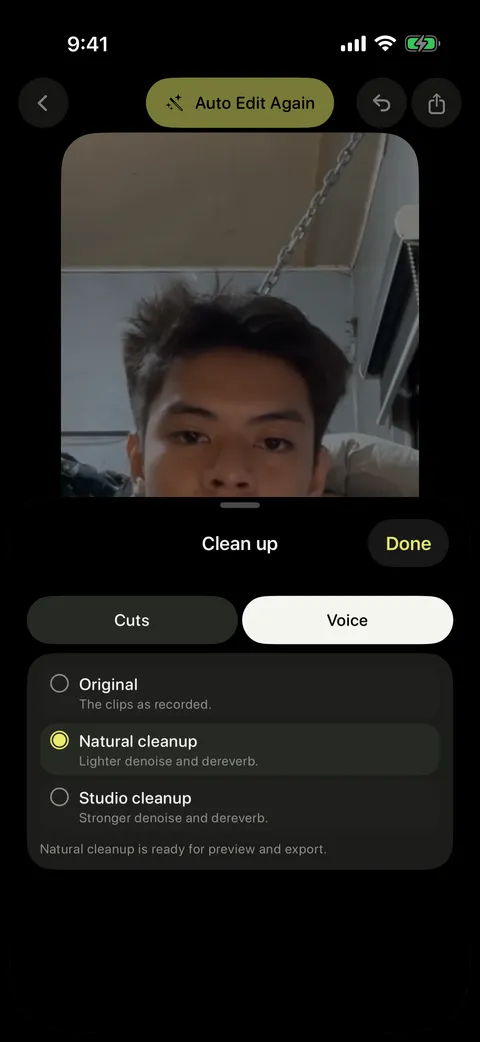
Voice
Better sound without a new mic
Natural and Studio cleanup take the edge off room echo and harsh phone audio. Compare both with the untouched recording before you commit.
- Hear each version before you pick one
- Your original audio is never overwritten
Captions
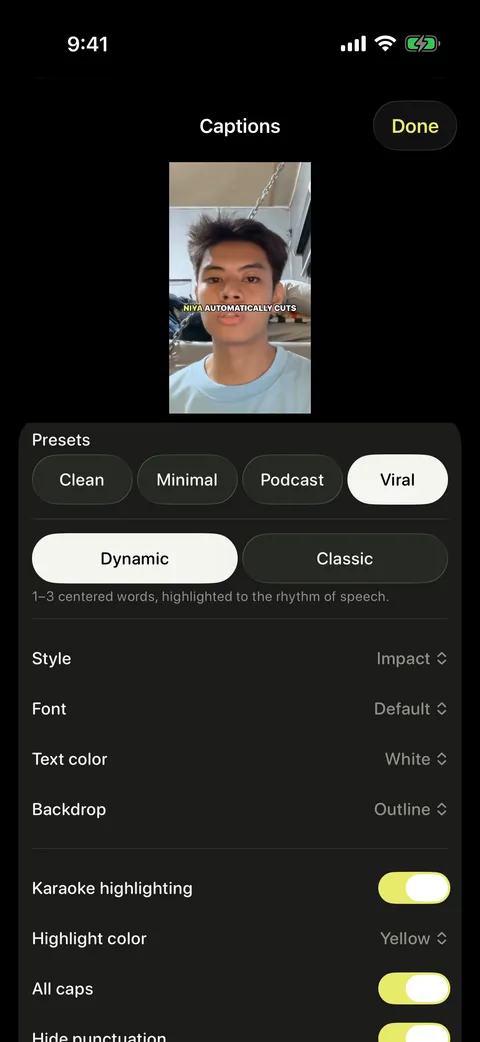
Captions ready before you post
Draft captions for a quick clip or a full lesson. Fix a misheard name, nudge the timing, and pick a style that fits your channel.
- Dynamic word-by-word captions, or Classic lines
- Clean, Bold, or Impact, in white, black, or yellow
- Your corrections are kept when you regenerate
Export
One edit, three shapes
Export the same edit as a vertical, square, or landscape MP4 at up to 1080p. Your footage is fitted to the frame and never cropped without you knowing. Save it to Photos or share it straight from the app.
9:16
Reels & Shorts
1:1
Feed
16:9
YouTube
On your phone
Your footage stays with you
Cutroom does the work on your iPhone. The first time you use captions, cleanup, or filler detection, it downloads what that step needs. Your video stays put.
Nothing uploaded
Finding cuts, cleanup, captions, and export all run on your iPhone. Your footage isn't sent anywhere to be processed.
No account
Open the app and start editing. There's nothing to sign up for and no cloud library to manage.
Every cut reversible
Restore any cut you applied, even after you close the app. Undo covers the rest of the session.
Saves as you go
Your cuts, caption fixes, and settings autosave, so you can put the phone down and pick up where you left off.
Does Cutroom upload my videos?
No. Finding cuts, voice cleanup, captions, and export all happen on your iPhone. Some steps download what they need the first time you use them, but your footage isn't sent anywhere to be processed.
Will it cut things without asking?
Never. Suggested cuts arrive dimmed so you can play each one, keep it, or cut it. Anything you apply can be restored later, even after you close the app.
Does it remove words like “you know”?
No. Filler detection looks for vocal sounds like “um” and “uh”. Words and phrases stay, so what you meant never changes. Filler detection is off by default; turn it on when you want it.
Which languages do captions support?
Choose Taglish, English, or Auto. Taglish keeps Filipino and English the way you mixed them, without translating either one. You can correct any line, and a project glossary helps with names and terms.
Which devices does it run on?
Cutroom is made for iPhone and needs iOS 18 or later. It exports up to 1080p at 30 fps.
Your next upload is already shot
Made for iPhone. Your footage never leaves it.